Docs Getting started
How Kizuna works
Kizuna is a local-first client plus a protocol implemented by SQL in your Supabase project: screens read and write a local SQLite database, and the client synchronizes that copy when the scheduler, the app, a connectivity transition, or an optional Realtime wakeup asks it to.
1. Your screen uses local SQLite#
A Kizuna driver names the SQLite file the Rust engine opens, through the shared locator port. Browser apps use the worker driver. It hands the client the Rust engine running as WebAssembly in a dedicated worker. That worker opens the database over the OPFS synchronous-access-handle pool, or over the relaxed IndexedDB fallback, so the page itself never opens SQLite. Expo can use expo-sqlite or the opt-in op-sqlite driver on device, and the browser driver on Expo web. Native Swift and Kotlin open a file-backed SQLite database through the Rust engine, and the kernel itself sets PRAGMA journal_mode = WAL on that connection: a native driver's job is to name or locate the file, never to open its own connection or choose its own journal mode.
The app-facing query builder deliberately resembles the offline-safe part of supabase-js: select with the filters and modifiers Kizuna can answer from SQLite. Supported reads and writes never need a network round trip, so the answer comes from the local database rather than from PostgREST. An unsupported operator throws LOCAL_UNSUPPORTED; it does not silently query Supabase, and Supported query operators lists what the subset covers.
2. Local writes enter a durable outbox#
An insert, update, or delete changes the local view optimistically and records a mutation in the same local store. A queued mutation survives closing the app and losing connectivity. Survival across abrupt process death depends on the driver and the platform, and Project status scopes that evidence per driver.
The outbox is durable, and the engine processes it in issue order. When a pull completes, the engine rebases the pending mutations over the incoming checkpoint, so your local edits stay visible and independent remote rows are not hidden. Offline writes is the guide for that path.
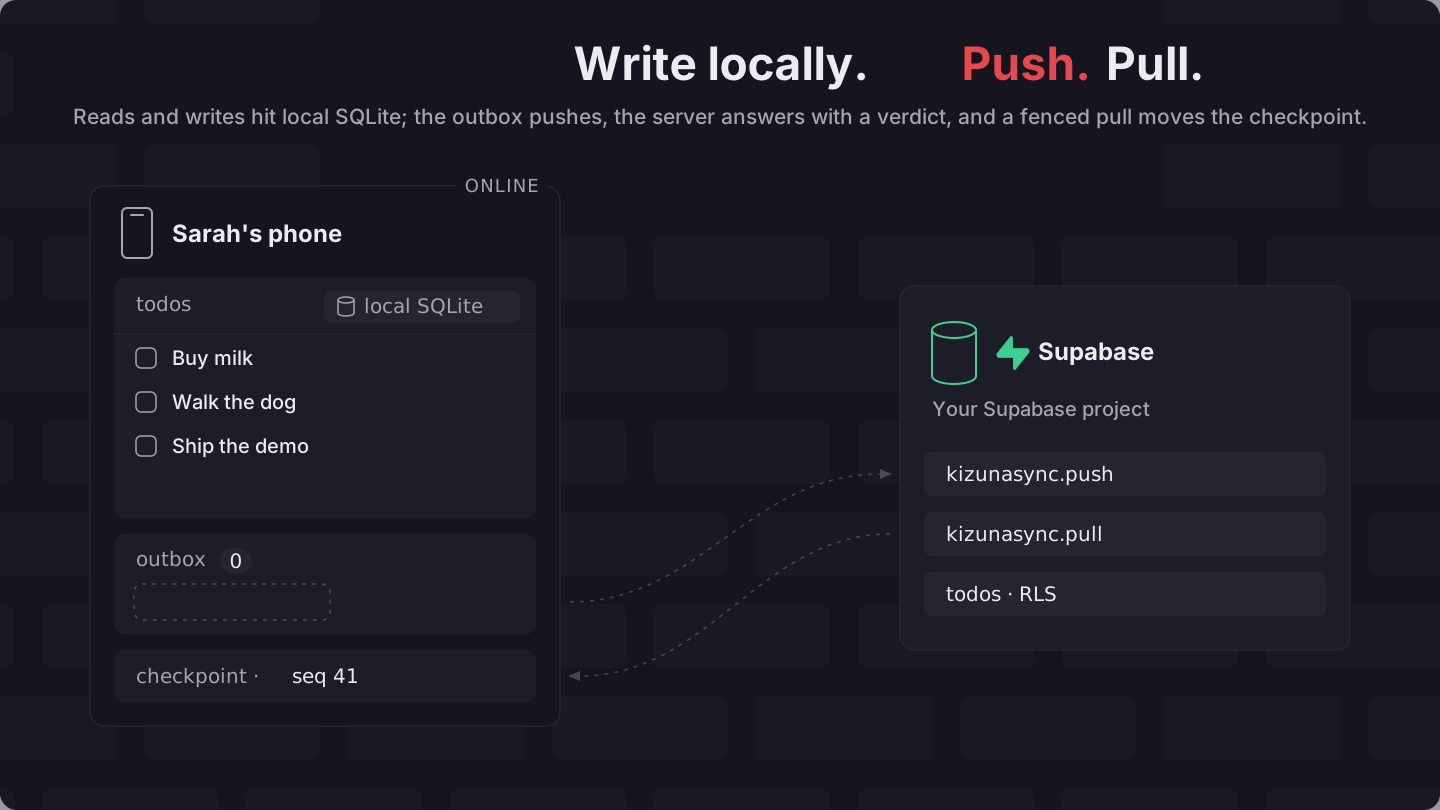
3. Push returns a verdict for each mutation#
The client sends batches to the provisioned kizunasync.push RPC. The public wrapper is SECURITY DEFINER so bookkeeping stays private, but application-row work is delegated to a NOBYPASSRLS helper under the caller's JWT identity. Kizuna therefore never takes the RLS bypass that a definer function normally grants, and your policies, constraints, preconditions, and configured push policies remain authoritative. Server-side validation walks the whole boundary.
A mutation verdict is either applied or rejected. Rejections leave the rest of a non-atomic batch able to progress and are recorded in the local rejection journal for the application to surface or dismiss. An atomic batch is all-or-nothing.
Transport failures retry according to the scheduler's backoff. A server rejection is a final protocol result for that mutation (not a transport retry), and your app decides how to show it.
4. Pull catches the local database up#
The client calls the provisioned pull RPC incrementally. The SQL pack records row changes and returns a checkpoint plus a fencing horizon. The pack numbers each change when its transaction commits, so a transaction that stays open has no number yet and holds back no other change. When it commits, its change lands above the horizon every earlier pull reached, and the next pull returns it. Without that rule, the cursor could pass a row that had not committed yet, and the row would never arrive. The price is that transactions changing synced tables commit one at a time.
Pull pages can overlap, and applying a change again is idempotent, which lets the protocol prefer safe redelivery over a lost committed change. Tombstones propagate deletes to a device that already holds a live copy of the bucket the row left, and prevent an older offline edit from resurrecting a row after the relevant history is known.
5. Wakeups and polling#
A Supabase Realtime message can tell a client that a synchronized table changed. Supabase documents the transport in Broadcast; Kizuna uses it as a doorbell alone, so the wakeup carries no authoritative row data and the client pulls through the fenced protocol regardless.
Wakeup delivery is optional and may be missed. The scheduler polls every 15 seconds by default, jittered so that many clients do not arrive at once, and stretches that gap to at most 30 seconds after consecutive failures. Missing a wakeup therefore costs latency rather than correctness, because the next poll or an explicit sync() finds the change anyway.
Conflicts are resolved per column#
Two devices that edit different columns of the same row both keep their edits. In the default arrival mode, competing edits to one column follow server arrival order, and the write carries no Hybrid Logical Clock metadata at all. A table configured with conflict_mode = 'hlc' mints that metadata instead and compares the supplied HLC values, and the server may clamp a clock that is implausibly far in the future.
Read Conflict resolution and Consistency model before designing user-visible conflict behavior.
Attachments have their own durable queue#
An attachment declaration combines a local file store with a transfer adapter. Metadata and transfer state live in the local queue; row data can refer to the eventual object path. Media and attachments is the guide.
For the Supabase adapter:
- Files of at most 6 MiB use the standard Storage upload request.
- Larger files use Supabase's resumable TUS endpoint in 6 MiB chunks.
- The queue persists a newly created TUS upload URL before the first chunk, and after an interruption it asks the server for the current offset and continues from there.
- Downloads verify the declared integrity metadata before the local file is considered ready.
JavaScript attachments use kizunasync.attachments and the file and transfer ports. Direct Swift and Kotlin hosts opt in with attachmentRoot on KizunaSyncClient.create (fromFile, resolveDownload, vacuum, watch). React Native UniFFI omits attachment_root so the JavaScript host's attachment queue owns bytes. The file picker remains the app's path into fromFile.
The queue operations are transactional, and their survival under abrupt process or device loss depends on the file store and the platform's SQLite build; the repository does not contain a complete kill and resume matrix for every platform.
Kernel and app clients#
The kernel is Rust, and every application language sits on that same bottom layer: Swift and Kotlin ship as generated UniFFI packages, while JavaScript loads a compiled N-API addon or a compiled WebAssembly worker. The app clients are peers (createKizunaSync in JavaScript, KizunaSyncClient in Swift, KizunaSyncClient in Kotlin). Building the JavaScript app client loads nothing. Its first use picks which compiled artifact to load, once, and walks three candidates in order:
- The driver may already carry a compiled engine. The browser worker driver hands over an engine transport rather than a SQL connection, and you reach its rows only through that transport. This branch therefore runs Rust or fails.
- If that is absent, the app client takes a UniFFI handle: the one the host injected, or else the one the driver's
loadNativeEngineloads, which is how thekizunasync/expodrivers reach the React Native module insidekizunasync. That is the React Native path, and it needs the Turbo Module linked into a native build. A loader that fails ends the choice there, with the loader's own message. - If UniFFI is absent as well, the app client loads the N-API addon. That is the Node and Bun path.
- If nothing loaded, that first use fails with
ENGINE_UNAVAILABLE, naming the artifact to install and every path it tried, rather than running a second implementation of the protocol. The client keeps that error, and every later engine call fails with it.
The driver names the store as databasePath, a file path or null for a private in-memory database, because the Rust core opens its own SQLite connection. The browser driver always does, using the name you passed it. Swift and Kotlin never reach this choice: KizunaSyncClient is generated over UniFFI.
No environment variable changes that order or its outcome: a missing artifact is an error, never a downgrade.
What is installed in Supabase#
The installable pack migration creates the kizunasync schema, ledger, protocol and maintenance functions, change-log and client state, grants, Realtime support, and guarded retention scheduling. Project-specific generated SQL registers synchronized tables and installs triggers on those application tables. What is installed itemizes every object.
Kizuna does not add sync columns to your application rows and does not replace their RLS policies. It does change your application tables in one respect: registering a table installs Kizuna triggers on it, and removing that table from synchronization drops them again.
The pack manifest separates one installable migration, 0001_kizuna_init.sql, from the demo fixture 0002_example.sql used by the repository's local stack, and from the public-demo hardening file under supabase/demo/.
Minimal composition#
// src/kizunasync.ts
import { byOwner, defineConfig } from 'kizunasync'
import { createSupabaseKizunaSync } from 'kizunasync/supabase'
import { createWebWorkerDriver } from 'kizunasync/web'
import { supabase } from './supabase-client'

const config = defineConfig({
  tables: { todos: { sync: 'read-write', bucket: byOwner('user_id') } },
})

export const kizunasync = createSupabaseKizunaSync({
  supabase,
  driver: createWebWorkerDriver('todos.db'),
  config,
})That module is the whole composition. A screen writes with kizunasync.from('todos').insert({ title: 'works on a plane' }), and the engine fills user_id with the signed-in user and mints the id. The first call opens the local database and starts the sync loop, which then runs on writes, poll ticks, the network coming back, a return to the foreground, and Realtime wakeups without another call.
Authentication remains the responsibility of the official Supabase client, whose token lifecycle Supabase documents in Auth sessions. createSupabaseKizunaSync observes session changes and forwards the current access token to the native HTTP remote when that engine path is active, so Kizuna adds no identity of its own. With anonymousSignIn: true, it signs in anonymously when a sync finds no session, restoring the session the device already had first. When the user JWT is missing, the client reports AUTH_SESSION_MISSING instead of falling back to the publishable key as Bearer. A session lookup that does not settle within 10 seconds fails the attempt retryably with AUTH_SESSION_TIMEOUT, and sessionTimeoutMs changes that deadline.
SQLSTATE 42501 on pull or push is a different failure. It points at a GRANT or anon role problem rather than a row-level RLS denial, so the engine treats it as retryable; Troubleshooting covers both signals.
On the web, createSupabaseKizunaSync treats visibilitychange, the resume of a frozen tab, and a bfcache pageshow as a return to the foreground. Each of those refreshes the session, reconnects Realtime when the client holds channels but the socket is down, and then wakes the scheduler. That last step matters because a backgrounded tab can lose its Realtime socket without an event. Supabase describes that case in handling silent disconnections. The native KizunaSyncScheduler refreshes the session JWT before each run.
Swift and Kotlin apps use KizunaSyncClient over UniFFI rather than createKizunaSync. The same kernel applies writes, pull and push, the rejection journal, events, and, when attachmentRoot is set, attachment bytes.
Next steps#
- Collaborative fields: increment, array transforms, and restoring an overwritten value.
- Quick start: provision your Supabase app with
kizunasyncfrom the terminal. - Offline writes: queue writes, show sync state, and handle a rejection.
- Media and attachments: the file queue end to end.
- Architecture: kernel, SQL pack, and what deliberately does not exist.
- Repository layout: where each package and crate lives.
- Protocol overview: pull, push, verdicts, and cursors on the wire.
- Comparison with alternatives: Kizuna next to PowerSync, Electric, Firestore, and others.
Found a problem? Edit this page on GitHub