Docs Sync
Offline writes
Queue writes on a device with no network, show what sync is doing while they wait, and handle the ones the server refuses. A write through kizunasync.from(...) commits to local SQLite, updates the UI, and joins the outbox for the next push, so it never waits for the network. A local constraint or an unsupported operation fails on the spot.
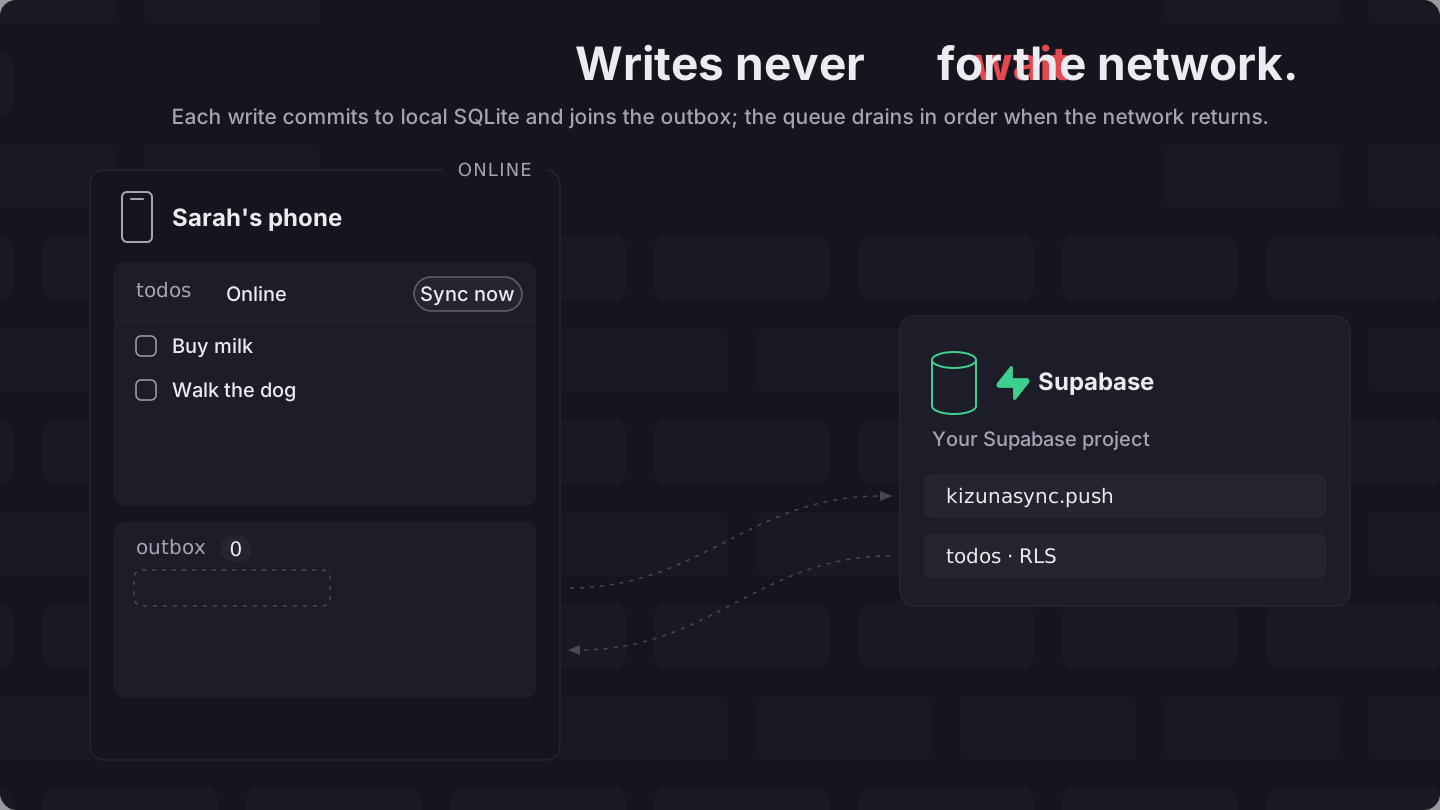
Write locally and Show sync state in your UI build the offline write path and the indicator your users watch. Handle a rejection and Subscribe to engine events cover the writes the server sends back. Model an invariant without a batch builder, Verify it worked, and Common errors cover the limit of the queue, the manual check, and the errors you are most likely to hit.
Before you begin#
- The app client is already running in your app, exported as
kizunasyncfromsrc/kizunasync.ts. Build one with the Quick start if you are starting from scratch. - The hook packages are
kizunasync/react(React, Expo, and React Native) andkizunasync/vue. MountKizunaSyncProvider,provideKizunaSync, orcreateKizunaSyncPluginabove the hooks. See React, Expo / React Native, and Vue. - Swift and Kotlin apps build the same indicator from
KizunaSyncClient.ondelivers engine events,outboxDepth()returns the pending count, andrejections()withdismissRejectioncovers the journal. Paironwith Combine or Flow to get a live status view. The hostKizunaSyncScheduler, built withKizunaSyncScheduler(client:, refreshSession:), runs one sync when it starts and another after every local write to its client. It also polls every 15 seconds by default, refreshes the session JWT before each run, and syncs again on a network path change and on a return to the foreground. Read the loop state from the scheduler'shealth()andonHealth: phase, failure streak, next attempt, last success, last error, andneedsReset. Swift and Kotlin builds the app'ssyncSchedulerbeside the app client. - Svelte, Solid, Angular, and every other JavaScript UI drive the app client directly through the Vanilla / other tab. There is no
@kizunasync/sveltepackage.
1. Write locally#
Call kizunasync.from(table) the way you would call a connected database.
// src/todo-actions.ts
import { kizunasync } from './kizunasync'

// Insert, update, and delete each commit locally and queue in one transaction.
export async function addTodo(title: string): Promise<void> {
  await kizunasync.from('todos').insert({ title })
}

export async function completeTodo(id: string): Promise<void> {
  await kizunasync.from('todos').update({ done: true }).eq('id', id)
}

export async function deleteTodo(id: string): Promise<void> {
  await kizunasync.from('todos').delete().eq('id', id)
}The insert leaves user_id out because todos declares a byOwner('user_id') bucket, and the engine writes the signed-in user's id into that column. It leaves id out as well, and the client mints a UUID for the row.
The row and its outbox entry are written in one local transaction, so a queued write and the row it produced always land together. The engine pushes entries in the order you made them. None of these functions calls sync(): every local write wakes the app client's sync loop, which pushes the outbox as soon as the network allows.
A completed pull commits the incoming checkpoint and then replays whatever is pending on top of it, so your unsent edits stay on screen and the rows other people changed stay visible underneath them.
Every mutation carries its own id, and the server keeps one verdict per id, so a push that is sent twice returns the recorded verdict instead of applying the write a second time.
You should now see the new row in the UI before any request leaves the device, and getOutboxDepth() should report one entry more than before the call.
2. Show sync state in your UI#
useSyncStatus returns the fields a sync indicator needs in React, Vue, and Expo. Call it with no argument: its isOnline follows the app client's connectivity, the online signal the sync loop itself reads. Swift and Kotlin read the loop's state from syncScheduler, the scheduler Swift and Kotlin builds beside the app client: onHealth delivers every change, outboxDepth() returns the pending count, and Sync now calls syncScheduler.wake(), which goes through the scheduler's session refresh and network gate.
// src/sync-bar.tsx
import { useSyncStatus } from 'kizunasync/react'

export function SyncBar() {
  const { outboxDepth, isSyncing, isOnline, isStalled, nextRetryAt, lastError, syncNow } = useSyncStatus()

  return (
    <div>
      <span>{isOnline ? 'Online' : 'Offline'}</span>
      {outboxDepth > 0 && <span>{outboxDepth} pending</span>}
      {isSyncing && <span>Syncing…</span>}
      {isStalled && <span>Reconnecting…</span>}
      {!isStalled && nextRetryAt !== null && <span>Retry at {new Date(nextRetryAt).toLocaleTimeString()}</span>}
      {lastError && <span>Error: {lastError.message}</span>}
      <button onClick={syncNow}>Sync now</button>
    </div>
  )
}<!-- src/components/SyncButton.vue -->
<script setup lang="ts">
import { useSyncStatus } from 'kizunasync/vue'
const { outboxDepth, isSyncing, isOnline, isStalled, nextRetryAt, lastError, syncNow } = useSyncStatus()
</script>
<template>
<div>
<span>{{ isOnline ? 'Online' : 'Offline' }}</span>
<span v-if="outboxDepth > 0">{{ outboxDepth }} pending</span>
<span v-if="isSyncing">Syncing…</span>
<span v-if="isStalled">Reconnecting…</span>
<span v-else-if="nextRetryAt !== null">Retry at {{ new Date(nextRetryAt).toLocaleTimeString() }}</span>
<span v-if="lastError">Error: {{ lastError.message }}</span>
<button @click="syncNow">Sync now</button>
</div>
</template>// src/components/sync-bar.tsx
import { Pressable, Text, View } from 'react-native'
import { useSyncStatus } from 'kizunasync/react'
export function SyncBar() {
const { outboxDepth, isSyncing, isOnline, isStalled, lastError, syncNow } = useSyncStatus()
return (
<View>
<Text>{isOnline ? 'Online' : 'Offline'}</Text>
{outboxDepth > 0 ? <Text>{outboxDepth} pending</Text> : null}
{isSyncing ? <Text>Syncing…</Text> : null}
{isStalled ? <Text>Reconnecting…</Text> : null}
{lastError ? <Text>Error: {lastError.message}</Text> : null}
<Pressable onPress={() => void syncNow()}>
<Text>Sync now</Text>
</Pressable>
</View>
)
}// TodoApp/SyncBar.swift
import KizunaSync
import SwiftUI
@MainActor
final class SyncBarModel: ObservableObject {
@Published private(set) var health = syncScheduler.health()
@Published private(set) var depth = 0
private var stopObserving: (() -> Void)?
func start() {
guard stopObserving == nil else { return }
stopObserving = syncScheduler.onHealth { [weak self] health in
Task { @MainActor in await self?.update(health) }
}
}
func stop() {
stopObserving?()
stopObserving = nil
}
private func update(_ health: KizunaSyncSyncHealth) async {
self.health = health
depth = (try? await kizunasync.outboxDepth()) ?? depth
}
}
struct SyncBar: View {
@StateObject private var model = SyncBarModel()
var body: some View {
HStack {
Text("\(model.depth) pending")
if model.health.phase == .syncing { Text("Syncing…") }
if let lastError = model.health.lastError { Text("Error: \(lastError.message)") }
Button("Sync now") { syncScheduler.wake() }
}
.onAppear { model.start() }
.onDisappear { model.stop() }
}
}// app/src/main/kotlin/com/example/todo/SyncBar.kt
package com.example.todo
import androidx.compose.foundation.layout.Row
import androidx.compose.material3.Button
import androidx.compose.material3.Text
import androidx.compose.runtime.Composable
import androidx.compose.runtime.DisposableEffect
import androidx.compose.runtime.LaunchedEffect
import androidx.compose.runtime.getValue
import androidx.compose.runtime.mutableIntStateOf
import androidx.compose.runtime.mutableStateOf
import androidx.compose.runtime.remember
import androidx.compose.runtime.setValue
import com.kizunasync.kizunasync.KizunaSyncSyncPhase
@Composable
fun SyncBar() {
var health by remember { mutableStateOf(syncScheduler.health()) }
var depth by remember { mutableIntStateOf(0) }
DisposableEffect(Unit) {
val stop = syncScheduler.onHealth { health = it }
onDispose { stop() }
}
LaunchedEffect(health) {
depth = runCatching { kizunasync.outboxDepth() }.getOrDefault(depth)
}
Row {
Text("$depth pending")
if (health.phase == KizunaSyncSyncPhase.Syncing) Text("Syncing…")
health.lastError?.let { Text("Error: ${it.message}") }
Button(onClick = { syncScheduler.wake() }) { Text("Sync now") }
}
}// src/sync-bar.ts
import { kizunasync } from './kizunasync'
// No framework binding: read the app client's state and wire your own UI.
export function mountSyncBar(label: HTMLElement, syncButton: HTMLButtonElement): () => void {
const render = async () => {
const pending = await kizunasync.getOutboxDepth()
// phase: idle | syncing | backoff | stalled | offline
const { phase } = kizunasync.getSyncHealth()
label.textContent = `${phase}, ${pending} pending`
}
const stopHealth = kizunasync.onSyncHealth(() => void render())
const stopEvents = kizunasync.on((event) => {
// QUEUE_DEPTH | MUTATION_REJECTED | BATCH_ABORTED | DEAD_LETTER | …
if (event.type === 'QUEUE_DEPTH') void render()
})
syncButton.onclick = () => void kizunasync.sync() // push, upload once the outbox drains, then pull
return () => {
stopHealth()
stopEvents()
}
}useSyncStatus returns eleven fields:
| Field | Type | What it is |
|---|---|---|
outboxDepth | number | Mutations pending in the outbox. Rejected and dead-lettered writes move to the rejection journal instead |
isSyncing | boolean | A syncNow() call from this hook is in flight |
isOnline | boolean | The app client's connectivity signal, or the one you pass as the connectivity option |
health | ISyncHealth | The automatic loop's phase, failure streak, next attempt, and last error |
isStalled | boolean | True when health.phase is stalled |
nextRetryAt | number | null | Epoch milliseconds of the next armed automatic attempt, or null when none is armed |
lastError | Error | null | The most recent rejection, batch abort, dead letter, or thrown sync |
checkpoint | TCheckpointState | The persisted cursor, schema version, and soft-block flag |
needsReset | boolean | True when checkpoint.softBlocked is set. A reset banner belongs on this, not on lastError |
softBlockReason | 'reset_required' | 'identity_changed' | null | Why sync is blocked: the server's schema gate refused this client, or another user signed in on this device. null while sync is not blocked |
syncNow | () => Promise<void> | Push, upload once the outbox drains, then pull |
Behind the hook the app client runs its own sync loop. The first attempt runs when the app client is first used, and the loop runs again after every local write, when the network comes back, when the app returns to the foreground, and when a Realtime wake-up arrives. Between those it polls every 15 seconds by default, at a random point between half the interval and the full interval so that many clients do not arrive at once, and it stretches that gap to at most 30 seconds after consecutive failures. A manual syncNow() or an automatic tick that finds the app client's connectivity reporting offline makes no network call at all: it resolves at once, and no attempt joins the failure streak or the health snapshot.
health.phase reports what that loop is doing right now: idle, syncing, backoff, stalled, or offline. isStalled turns true once an attempt has gone two poll ticks without settling. Two ticks rather than one keep a merely slow sync from being reported as wedged. isSyncing covers your own syncNow() call alone, so a background poll never flickers the button. Sync health documents the snapshot field by field.
Turn the network off and you should now see the indicator switch to Offline with a rising pending count. Turn it back on and the count should reach zero without a reload.
3. Handle a rejection#
The device accepts a queued write locally, and the server judges it later. Row Level Security, a database constraint, a precondition, or a peer's delete can all refuse it once the push runs, so the outcome you show a user comes back seconds or hours after the edit. Supabase documents the policy side in Row Level Security.
For a recognized verdict, the engine reconciles the local row, records the outcome in the rejection journal, and emits a typed event. The original write promise settled long ago, so nothing throws at the call site. If the UI reads neither the event nor the journal, the row reverts under the user with no explanation.
Malformed envelopes and unknown protocol values throw typed errors. Those reject the sync() promise, so syncNow() reports one through lastError, and one thrown on an automatic attempt lands in health.lastError.
subscribeVerdictToasts from kizunasync maps every rejection to a message and hands it to your toast presenter in one call. Pass your presenter as notify and call showVerdictToasts once when your app starts:
// src/verdict-toasts.ts
import { subscribeVerdictToasts } from 'kizunasync'
import { kizunasync } from './kizunasync'

// notify is your toast presenter; the returned function unsubscribes.
export function showVerdictToasts(notify: (message: string) => void): () => void {
  return subscribeVerdictToasts(kizunasync, ({ title, message }) => notify(`${title}: ${message}`))
}Each message also carries a level, 'error' or 'warning', for a presenter that styles the two differently.
Two event shapes cover individual and batched writes:
MUTATION_REJECTED: a single write was refused. A mutation is one unit, so the server applied none of it. The engine reverts the local row, clears the outbox entry, and emits{ type, mutationId, reason }. One rejection never blocks the rest of the queue.BATCH_ABORTED: an atomic batch (writes sharing abatchId) was refused server-side. The server reverts the whole batch and returns one outcome. The engine reverts every member to its pre-image and emits{ type, offenderMutationId, reason }.
The reason field is a closed string union. Surface the literal in your UI rather than matching on the text:
reason | What happened |
|---|---|
RLS_DENIED | Row Level Security refused the write. The local row reverts to the server row, and it is deleted when the server row is invisible to this user. |
COLUMN_DENIED | The write named a column your role may not update. The local row reverts to the server row, narrowed to the columns you may read. |
PRECONDITION | The optimistic check failed against the current server state. The local row reverts to the current server row. |
CONSTRAINT | A database integrity constraint, a value your column type refused, or an app trigger's bare RAISE EXCEPTION failed when the server applied the write. Unique, not-null, foreign key, check, and exclusion violations all arrive under this reason. |
DELETE_WINS | A peer deleted the row and left a tombstone of a bucket you already synced a live copy from, so editing it is refused. The local row is deleted. |
SUPERSEDED | In hlc conflict mode, every masked column lost the per-column HLC compare. The whole mutation reverts to the winning server row. |
Caution: a client that has drifted from the server schema pack loses sync progress rather than a row. A
reasonvalue the engine does not recognize throwsTEngineError(UNKNOWN_VERDICT_REASON)instead of reverting on a guess, so the write stays queued until a matching client ships. Keep the two in lockstep.
Transport failures follow a different path. Network loss, a 5xx, an expired JWT, and a Supabase session lookup that does not settle within 10 seconds (AUTH_SESSION_TIMEOUT) are all retryable, so the write stays queued and the loop tries again for as long as it takes. Supabase covers the token side in Auth sessions.
Only a failure the remote marks permanent counts against a budget, and a lone queued write or an atomic batch owns that budget outright: after five of those against it, the engine reverts the row to its pre-image, writes it to the dead-letter journal, and emits DEAD_LETTER. A permanent failure of a wider, non-atomic slice is never charged to the slice, because the response names no single mutation as the cause; the engine narrows the slice instead (halved on KZP02, cut to the head write on any other permanent code) and resends at once, so retries converge on the one write that then owns its own budget. A push failure never blocks the pull that follows it unless the failure itself is retryable, so a refused write holds back neither your own remote rows nor anyone else's.
You should now see a toast naming the reason when a write is refused, and the affected row back at the value the server holds.
4. Subscribe to engine events#
Use kizunasync.on when a toast is not enough, for example to log a rejection to an error tracker or to highlight the row that changed.
// src/sync-events.ts
import { kizunasync } from './kizunasync'

// notify shows or logs a message (a toast, an error tracker); call this once when your app starts, and the returned function unsubscribes.
export function watchSyncEvents(notify: (message: string) => void): () => void {
  return kizunasync.on((event) => {
    switch (event.type) {
      case 'LOCAL_CHANGED':
        // Local data changed after an optimistic write or a pull commit.
        // Reactive bindings (useQuery) re-read on their own; nothing to do here.
        break
      case 'MUTATION_REJECTED':
        // event.mutationId, event.reason
        // The local row is already back at the server's value.
        notify(`Write rejected: ${event.reason}`)
        break
      case 'BATCH_ABORTED':
        // event.offenderMutationId, event.reason
        // An atomic batch was refused; every member reverted.
        notify(`Batch aborted: ${event.reason}`)
        break
      case 'DEAD_LETTER':
        // event.mutationId, event.reason
        // Five permanent transport failures: the mutation left the outbox and was journaled.
        notify(`Could not sync mutation ${event.mutationId}`)
        break
      case 'COLUMN_OVERWRITTEN':
        // Tables with the conflict journal on: a column of yours lost to a peer's write.
        // event.table, event.pk, event.column, event.loserValue
        break
      case 'QUEUE_DEPTH':
        // event.depth, the same number outboxDepth reports.
        break
      case 'RESET_REQUIRED':
        // event.reason: 'reset_required' when the server's schema_version is above the client minimum
        // (prompt the user to update the app), 'identity_changed' when another user signed in on this device.
        // Sync stays soft-blocked until reset().
        break
      case 'CHECKPOINT_EXPIRED':
        // The stored cursor is too old to resume from, so the client re-hydrates from scratch.
        break
    }
  })
}MUTATION_REJECTED, BATCH_ABORTED, DEAD_LETTER, COLUMN_OVERWRITTEN, and QUEUE_DEPTH report what became of a queued write. CHECKPOINT_EXPIRED is a different kind of news: the cursor the client saved is older than the oldest tombstone the server keeps, so the local database is filled again from the start.
useSyncStatus subscribes internally and surfaces MUTATION_REJECTED, BATCH_ABORTED, and DEAD_LETTER through lastError, so reach for kizunasync.on when that one field is not enough. COLUMN_OVERWRITTEN has its own durable read instead: kizunasync.overwrites(), or useOverwrites in React and Vue, so a component that missed the event can still show what a peer replaced.
You should now see one handler call per event while you take the device offline and back.
5. Model an invariant without a batch builder#
The engine and the wire protocol understand batchId and BATCH_ABORTED, but the application builder does not expose a batchId option. insert(values) takes one argument, and update(values, options?) and delete(options?) accept precondition alone. Do not copy examples that pass { batchId } to these methods.
Inside the engine a batch is real. When the head of the outbox carries a batch_id, the push sends that whole consecutive run as one atomic request rather than truncating it, and an aborted reply reverts every member the request carried, writes one journal row, and emits one BATCH_ABORTED. Nothing in the public JavaScript surface sets a batchId, though, so an application cannot reach that path. Express an all-or-nothing rule as one server-side operation instead.
Your code should now pass no batchId to insert, update, or delete.
6. Verify it worked#
Open the todo example app, check Offline in the network tab of DevTools, add a todo, then re-enable the network. You should see:
- The todo in the list at once, before any request.
outboxDepthat 1 while the network is off.outboxDepthback to 0 shortly after reconnecting.- No duplicated row and no flicker as the pending row is confirmed.
Test offline behavior shows the headless engine and example integration tests for retries, acknowledgments, and rejections. None of them kills a running browser or a native process, so a pass is evidence for the engine path it runs and not for crash safety.
Common errors#
LOCAL_UNSUPPORTEDon insert, update, or delete means the table'ssyncis'pull-only'in Define config. The builder refuses the call before the write reaches the outbox.BUCKET_UNSETmeans a sync ran beforesetBucketfilled abyColumntable, or the call carried a key no table declares as a bucket column. AbyOwnertable needs no call, because the engine fills it once a user signs in on the device. Sync rules & buckets covers both helpers.- For rejected writes with no feedback, render
lastErrorfromuseSyncStatus, or subscribe withkizunasync.onand handleMUTATION_REJECTED,BATCH_ABORTED, andDEAD_LETTER. A local write is rejected and compensated works the same path from the symptom. - Rows flickering back after an offline edit means two devices edited the same column. Column-level last-writer-wins by server arrival order is the default. For text fields where concurrent edits matter, use an append-style model or the
hlcconflict mode. See Conflict resolution.
Next steps#
- Conflict resolution: which write wins a contested column, and what the loser leaves behind.
- Consistency model: what Kizuna promises across devices, and what needs an online transaction.
- Collaborative fields: increment, array transforms, and restoring an overwritten value.
- Sync health:
getSyncHealth()andonSyncHealth()field by field. - React useSyncStatus and Vue useSyncStatus: the full return tables for both bindings.
- Test offline behavior: headless retries, reconciliation, and rejection paths, and the checks that need a real browser or device.
- Protocol overview: how push verdicts, batches, and the checkpoint replay work on the wire.
Found a problem? Edit this page on GitHub